If you are a simracing enthusiast and play F1 25 with a Fanatec steering wheel, you will know that correctly configuring the force feedback and steering wheel settings can make all the difference to your on-track performance.
In this guide, we show you the best F1 25 Fanatec settings to get the most out of your Clubsport DD or DD+ steering wheel.
🔧 Recommended configurations for Fanatec in F1 25
🏎️ Best force feedback setting to feel every detail of the track
🎮 Optimal settings on PC, PS5 and Xbox
⚙️ Advanced settings to improve stability and traction
Best Fanatec configuration for F1 25 and F1 24
Here are the best settings for your Fanatec steering wheel to work optimally in F1 24 and F1 25.
These values have been tested to offer a perfect balance between realism and control, without the steering wheel feeling too heavy or too light.
⚙️ Settings in Fanatec software (Fanalab or steering wheel menu)
To configure your steering wheel correctly in Fanalab or from the Fanatec steering wheel menu itself, use these recommended values:
Fanatec Clubsport DD and DD+ Settings
| Configuration | ClubSport DD | ClubSport DD+ |
|---|---|---|
| SEN (Sensitivity) | 380° | 380° |
| FFB (Force Feedback) | 70 | 60 |
| FUL (FullForce) | 50% | 50% |
| NDP (Natural Damper) | 50 | 40 |
| NFR (Natural Friction) | Off | Off |
| NIN (Natural Inertia) | Off | Off |
| INT (Interpolation filter) | 11 | 11 |
| FEI (Intensity of the force effect) | 100 | 100 |
| FOR (Force) | 100 | 100 |
| SPR (spring effect) | 100 | 100 |
| DPR (Damping) | 100 | 100 |
Settings Fanatec CSL DD and DD Pro
If you play on PC, PS5 or Xbox with a Fanatec CSL DD or DD Pro, these settings will optimize your F1 24 experience:
| Configuration | PC/PS5 | Xbox |
|---|---|---|
| SEN (Sensitivity) | 380° | 380° |
| FFB (Force Feedback) | 100 | 100 |
| FFS (Force Feedback Scaling) | Peak | Peak |
| NDP (Natural Damper) | 35 | 50 |
| NFR (Natural Friction) | Off | Off |
| NIN (Natural Inertia) | Off | Off |
| INT (Interpolation filter) | 3 | 3 |
| FEI (Intensity of the force effect) | 100 | 100 |
| FOR (Force) | 100 | N/A |
| SPR (spring effect) | 100 | N/A |
| DPR (Damping) | 100 | N/A |
📌 Tip: Adjust the force feedback depending on your driving style. If you feel that the steering wheel is too strong or too soft, try modifying the FFB and FOR until you find the ideal point.
F1 25 Fanatec Settings (in-game)

Once the steering wheel has been configured in Fanalab, it is time to adjust the F1 24 Fanatec in-game settings.
Go to Settings > Controls, vibration and force feedback, and use the following recommended values:
Clubsport DD and DD+: Setting menu configuration
| Configuration | Value |
|---|---|
| Vibration and force feedback | On |
| Vibration Intensity and FFB | 100 |
| Track effects | 20 |
| Curb effects | 10 |
| Off-track effects | 5 |
| Flywheel damper | 2 |
| Flywheel rotation (F1) | 380° |
Fanatec DD Pro and CSL DD: Setting up the setup menu
| Configuration | PC/PS5 | Xbox |
|---|---|---|
| Vibration and force feedback | Activated | Enabled |
| Vibration Intensity and FFB | 70 | 65 |
| Track effects | 30 | 30 |
| Curb effects | 30 | 30 |
| Off-track effects | 15 | 15 |
| Flywheel damper | 3 | 5 |
| Flywheel rotation (F1) | 380° | 380° |
📢 Important:
- Adjust the intensity of the force feedback according to your personal preferences.
- If the steering wheel feels too strong in tight turns, it reduces the force effect on the steering wheel.
- If you notice that the vibrations are too aggressive, lower the vibration effect on the steering wheel.
Tips for improving force feedback in F1 25
If you feel that the force feedback is not responding as it should, try these tips:
- Adjust the intensity of the force feedback according to your comfort.
- If the steering wheel feels too heavy, lower the FFB a few points.
- If you feel that the force feedback is weak, turn it up.
- Avoid exaggerated damping settings.
- Too high NDP (Natural Damper) can make the flywheel feel sluggish and unresponsive.
- Experiment with natural friction and inertia.
- Some players prefer to have NFR and NIN at low levels to make the steering wheel feel freer.
- Adjusts in-game effects.
- If you feel a lot of vibrations on curbs or off track, lower the values of rumble strip effects and off track effects.
- Make sure your firmware and drivers are up to date.
- Fanatec often releases updates to improve compatibility and performance.
🎮 F1 25 Fanatec Settings configuration on PC, PS5 and Xbox
The above settings are valid for PC, PlayStation 5 and Xbox, but there are small differences depending on the platform you use.
🔹 PC: Adjust values directly from Fanalab for further customization.
🔹 PS5/Xbox: Some values may require further manual adjustment within the game.
If you play on console, the key is to adjust the sensitivity and strength of the force feedback to avoid the steering wheel feeling too heavy or too soft.
📢 Tips to enhance the F1 25 experience with Fanatec
1️⃣ Avoid too high a force feedback: A value above 100% can cause fatigue and you will lose precision when cornering.
2️⃣ Adjust the steering wheel rotation: The best setting is 360°, similar to real F1 cars.
3️⃣ Try different damping values: 20%-30% is usually ideal, but adjust according to your preference for more or less stability.
4️⃣ Use the Fanalab for fine tuning: From there you can fine-tune values such as flywheel inertia and friction.
5️⃣ If the car feels unstable, check the steering settings: Too high a setting can make the response too aggressive.
🏁 Conclusion: The best Fanatec configuration for F1 25
Setting up your Fanatec steering wheel correctly can enhance your feeling of realism and control in F1 24.
🔹 Better settings in Fanalab: Use 80%-100% force and keep the FFB stable.
🔹 Best settings in F1 24: Set the force feedback to 85%, with 360° rotation.
🔹 Test and adjust: Every driver has his own style, so experiment with the values until you find the perfect balance.
With these F1 24 Fanatec settings, you’ll be ready to maximize your on-track performance and enjoy the most realistic experience possible.
Do you have a configuration that worked better for you? Leave it in the comments!
If you can afford it, it’s hard to find anything better on the market.
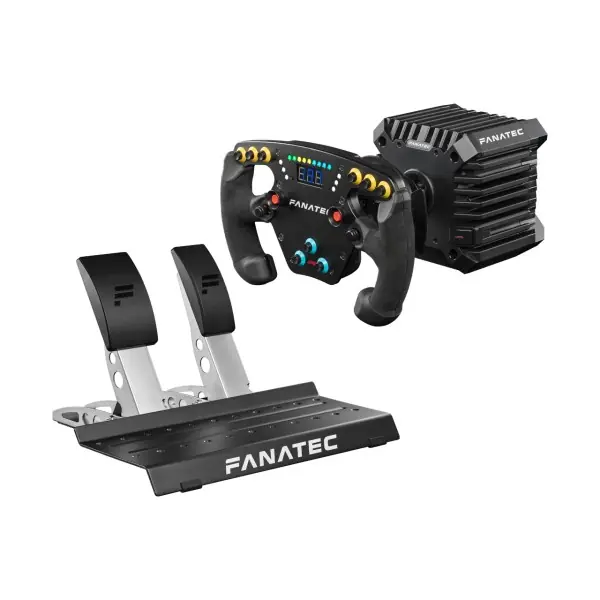
Fanatec CSL DD F1 Sports

Fanatec F1 Clubsport steering wheel
Want more? Here are the best Fanatec steering wheels and best Fanatec PS5 steering wheels.
Read our review of the Fanatec F1 Clubsport Wheel here.


